Pages

Showing posts with label Padlet. Show all posts

#D100bloggerPD's Book Study on Hacking Engagement: 50 Tips & Tools to Engage Teachers and Learners Daily, Hacks 1-5 (including a few tweets)

Welcome back for another #D100bloggerPD crew book study. I take pleasure in starting our book study posts with an introduction of the crew. We consist of an assortment of Berwyn South School District teacher and administrator learners who enjoy blogging, are smitten with social media and make use of our PLNs as an irreplaceable source of powerful content, hence the hashtag #D100bloggerPD. We devote ourselves to staying globally connected. The crew embraces change, strives to better ourselves professionally and desires to join forces with others to share what we learn because...together we are better!

This #D100bloggerPD is dedicated to James Alan Sturtevant's Hacking Engagement: 50 tips & Tools to Engage Teachers and Learners Daily. If you want a roadmap to capturing your students' attention, read this book. It's yet another invaluable book in the Hack Learning series. Mark Barnes and Jennifer Gonzalez conveyed practical and user-friendly ideas and tools for each hack in their book, Hacking Education, while Michael Fisher dispensed solutions to problems that seem to go hand in hand with the Common Core in his book, Hacking the Common Core. Now, it's time to highlight James Alan Sturtevant and his contribution of a whopping 50 strategies for all teachers and learners to be gurus of engagement! It was thrilling to see my copy of the book on the doorstep, and after reading it, I believe Sturtevant's hacks have the power to enlighten teachers on how to unlock the doors to fully engaged students.
Before I share about this book, I would like to mention how accommodating Mr. Sturtevant has been at supporting the crew. The moment a tweet went out about the #D100bloggerPD book study, he jumped at the chance to help. Good news! He's decided to join us on Twitter to chat more about how to hack engagement, so be on the lookout for a live Twitter chat on November 7, 2017. Anyone is welcome to join us! Ready to get started? Let's do this. :) 

Each crew member has chosen five out of the fifty, nifty hacks for the book study. We decided to encapsulate four hacks to give you a sense of what the book offers, while diving more deeply into one hack to demonstrate how we've implemented a particular engagement strategy. I'm kicking off the #D100bloggerPD book study with Hacks 1-5.
Hacking Engagement is filled with supportive QR codes for its readers. Sturtevant states, "When I was in the process of crafting this book, I launched the Hacking Engagement podcast, which mirrors and supplements these pages. As you read, you'll frequently encounter QR codes that will connect you to episodes (p.10)."  I've decided to link a few of his supportive podcast episodes and QR codes throughout this post for your convenience. Thank you, Mr. Sturtevant! #generous #grateful
Hack 1: Entice Reluctant Readers with QR Codes
Some of you may already know I've been an elementary Reading Specialist for the past the 9 years, but have recently added the role of Literacy Coach this past August. Being a gal who loves all things literacy, I felt delving into the hack dedicated to enticing reluctant readers would be most plausible. :)

In this hack, Sturtevant details the beliefs of Jennifer Wilson, a coordinator of instruction and innovation. Jennifer believes QR codes are an entryway connecting students with virtual content. Jennifer "uses them to link students to alluring information about books in the form of book trailers. Just as a successful movie trailer engages the audience to the point where they become obsessed with watching the show, book trailers draw in potential readers (p.11-12)." I've seen, firsthand, how QR codes and book trailers increase student engagement.

As a teacher working with mostly struggling and reluctant readers, I, thankfully, found the power of *the codes* a few years back. QR codes have been used in my intervention classroom because they not only engage my readers in school, but at home, too. Book trailers definitely have a way of lighting a spark under the most reluctant readers. When my students were given opportunities in class to entice others with trailers about their favorite books via QR codes, the student engagement and reading minutes skyrocketed. Students even requested to continue reading and creating trailers at home, as well. 
 
My students create QR codes with qrstuff.com and use free scanner apps, such as QR Reader and Scanner or i-nigma Barcode Reader, to showcase and access their content. Additionally, I often use the virtual discussion platforms, TodaysMeet and Padlet, in connection with the codes.  
The combination of these tools allow my students to highlight and discuss books they're reading with peers. After creating brief book trailers, they've uploaded them to Padlet walls, alongside *shelfies*, which are selfies with favorite books. Furthermore, my students have answered questions posted by peers about their book trailers and/or started discussions about books we've been reading on TodaysMeet.
To learn more about how I incorporate and link QR codes to content, read some of my previous posts by clicking HERE and HERE. I've even created student resources that include QR codes as a captivating way for students to self-check their work. Notice the smiles on a few of my first graders as they self-check their answers regarding multisyllabic words? #engagement
What YOU Can Do Tomorrow:

Hack 2: Adventures in Classroom Management
This hack is targeted at managing a classroom through organized routines. Sturtevant references Andy Jados, a high school principal, who has "learned that putting effort into organizing a congenial atmosphere benefits everyone (p.15)." Getting students engaged in the management of class is what produces results.

I'm sure you'll agree, one of the most important roles of a teacher is that of a classroom manager. If student learning and engagement are going to thrive, it's critical. A room filled with distractions and disorderly management can have a negative impact on students' academic performance. If we're openly honest, each of us has had moments of disorganization at some point as educators. It's okay to admit we're all human. Thankfully, perfection is not necessary for a well organized classroom. What's most important is we learn from those moments of disorganization to take steps necessary to change the outcome. Take a peek below at Sturtevant's constructive course of action to better engage students into a more manageable classroom.

What YOU Can Do Tomorrow:
  • Make a list of common distractions in your class: Think...What is disrupting the learning from taking place? 
  • Create an organization plan: Generate routines to prevent interruptions.
  • Promote your plan: Let students in on your goals to get buy-in.
  • Assign students tasks: Deputize student helpers! Tip- You may wish to give some of your most disruptive students responsibilities (p.17).
  • Debrief students: Empower them by seeking their suggestions on how to improve your plan.
For further information on this hack, check out Sturtevant's podcast as he teams up with Andy Jados to discuss classroom management.

Hack 3: Let Me See You Google
After reading Hack 3, I wanted to share a few favorite quotes with you that really encompass this hack:
  • A school that embraces Google embraces collaboration (p.19).
  • Google is engaging, powerful, familiar, and pervasive (p.19).
  • Quite simply, students are extremely comfortable expressing themselves through Google (p.20).
  • The world collaborates with Google. Make certain that you interact with students via this foundational platform (p.21).
I work in a school district that undeniably harnesses every bit of the power Google has to offer. Our staff collaborates district-wide with one another through Google Docs and Google Forms, as well as communicates with students and parents through the use of Google Classroom. We are extremely fortunate to be a Google District. If you're not using Google, what are you waiting for? They have free tech tools to engage your students.

What You Can Do Tomorrow:
Check out this podcast or scan the QR code below to learn more about Google and all of its benefits for student engagement.

Hack 4: Engage as You Gauge with SurveyMonkey
This hack is all about targeting students' preferences to get them engaged. Sturtevant says, "When it comes to our students, let's become detective-like and solve the mysteries of their preferences. Once we know what appeals to the kids we teach, we can take advantage of this knowledge to engage them in learning (p.23)." A simple, yet engaging way to seek student preferences is through the use of SurveyMonkey.

Scan the QR code below for more information.
Hack 5: Create Celebrity Couple Nicknames
My last hack for this post quickly brought to mind the well-known celebrity couple name, Brangelina. This hack is all about name blending as an amusing and engaging way to learn students' names. Sturtevant declares, "Creating celebrity nicknames will transform this tedious chore into a fun game that students will love, and it will help you connect with them immediately (p.29)."  I tried putting this hack into action with the use of Couple Name Generator. Try it for yourselves! You may even want to share it with your students. :)   
Thanks for stopping by Literacy Loving Gals to kick off the book study. As the study continues in the upcoming weeks, the hyperlinks to each #D100bloggerPD crew member's posts will be added HERE to help keep the fifty, nifty engagement hacks in one spot. We hope you continue to follow along with us!

Next up: See Jane Blog

Happy Engagement Hacking! 


Using Today's Meet, Padlet Walls and QR Codes for Reading Engagement

This post is dedicated to one of my very talented and dedicated teacher friends, Kelly, who is also a motivating workout partner, as well as a few of my awesomely accomplished #PLN pals on Instagram: Sarah from Snippets by Sarah, Lori from Conversations in Literacy and Christiana from Lasting LiteracyThey inquired about the use of the QR code in the picture above, and instead of explaining it on Instagram, I decided I'd write a little "tech post", since it's been a while. 

In this post, I will share some information to help you create a TodaysMeet chat room, in addition to a Padlet wall. Both of these platforms are wonderful backchannels to hold students accountable and to capture their thinking! I will then go on to explain how students can access these online platforms without an account, login or password. In this case, I truly believe these online platforms are quite easier used than explained, but let's see how I do. ;)

To keep my students interested, engaged and accountable when responding to reading inside or outside of my RtI intervention room, I have them use a combination of tools: QR code scanner apps, such as QR Reader and Scanner or i-nigma Barcode Reader, QR codes from qrstuff.com, TodaysMeet and Padletall which are FREE. That's the best part, for sure. 

I am blessed to work in a school district implementing 1:1 iPad technology. All students have access to their own iPad, and since my intervention time is so brief with the students, these tools can be used from their classroom, home, or even the library, as long as they have their book, a QR code and an iPad or other device loaded with a scanner app. 

Let's get underway. Since YouTube is my go-to resource for all how-to tutorials, I used this link HERE to learn  how to set up my chat room, so please take a moment to do the same before continuing. Multiple temporary chat rooms can be created and sorted, depending on your needs. Your chat rooms have an expiration date extending anywhere from one hour to one year. 
Once my students are in the chat room, I have them enter their initials in the Nickname area, hit Join, type their responses to my posed question(s) into the blue box and then hit Say. When the students strike the Say button, others in the group can view their peers' responses, similar to a working document in Google.
Student comments and responses can only be 140 characters, just like Twitter, however, they can respond multiple times. This allows students to extend on their thoughts, read and respond to others' comments, as well as pose their own questions they may have. It's a great way to get kids engaged in conversations with peers about their reading. Since responses are typed, there are no interruptions from others around them. This is definitely a pro, especially in a classroom with 28+ students. Having typed responses also gives a voice to shy students who my be hesitant to amplify their voice in an oral classroom discussion. Empowering, right? 

An example of a few responses from a 3rd grade group is below. Keep in mind, we are an intervention group, so student responses and ideas are always under construction, but ever evolving. ;)
Moving on to Padlet. Once again, I self-educate on YouTube, so click HERE for the teacher tutorial video that helped me create my own walls. Padlet is just as simple to set up as TodaysMeet and permits you to create unlimited walls, just as TodaysMeet enables you to create as many chat rooms as you wish. You have the ability to customize each wall with different backgrounds, in addition to wall names and descriptions.

Once you create a wall, students access it with a link you provide them. (The video tutorial explained one way to share the link, but at the end of this post, I will show you another way. Hang tight!) Students double click in an open area on the wall. The box below is what the students view once they have double clicked. The icons in the box allow students to add text, record their voices (videos), add hyperlinks, photos and documents. Amazing customizable uses, especially for a free platform.
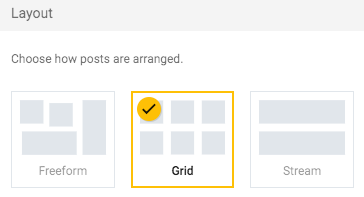
You can organize the students' response posts in 3 ways: Freeform, Stream and Grid. I usually choose Grid as shown in the picture below, so the most recent posts appear first. Both TodaysMeet and Padlet allow teachers to view the students responses while they're working, so you can keep track of their participation, or lack of participation in some cases.
If you prefer to keep your wall private from the public, there are options to do so. I prefer to keep my rooms Secret.
I recommend you playing around with Padlet a bit to get the hang of how to use it. There are plenty of links out there on the web to support you, but there's Padlet at a glance. If you would like to see a previous post I've written on using Padlet in the classroom alongside a makeshift *recording booth*, click HERE

Lastly, you may be asking yourself, how do my students access the TodaysMeet chat rooms or Padlet walls I create? Well, all you have to do go to qrstuff.comcopy and paste each URL from the chat rooms and Padlet walls you have created into where it says Website URL (see the blue arrow). Choose the color for your QR code, then download the customizable code that appears. 
I love how the codes can be created in different colors. My students have associated my blue codes, for example, with TodaysMeet and my black codes with Padlet, even though I print them out with headings. For example, the blue code has Team Noffsinger's TodaysMeet Access Code typed above it.


As a last step, I print out the codes, sticky tack them to my classroom walls in different areas, as well as send them home in the students' Take-Home book bags. They use their iPad or other device to pull up a scanner app, such as QR Reader and Scanner or i-Nigma Barcode Reader, to scan the code to access the chat room or wall. 

I hope this post was helpful to someone out there and that I haven't confused you. Please be willing to explore a bit. I think you'll be happily surprised. 

Have a great weekend!

UPDATE: #Yay :)


Amplify Your Instruction with Kristin Ziemke and Katie Muhtaris!

Good morning! If you weren't already aware, my school district participates in biweekly Twitter chats using the hashtag #D100chat. I love participating in the chats because they promote professional growth as an educator and bring the colleagues in my district closer together. As you know, collaboration is viewed as one of the keys to success! Our Twitter chats focus on a variety of topics, including district-wide professional book studies, content-area literacy, ELL resources, SAMR & TPACK, genius hour, CCSS math practices and more.  

I know it's late notice, but our next chat is today, May 3rd! The topic is all about amplifying your digital learning and instruction. Can you guess who our guest moderator will be? Kristin Ziemke!  Katie Muhtaris and Kristin Ziemke wrote the book Amplify: Digital Teaching and Learning in the K-6 Classroom.  If you don't own it, I highly recommend the purchase. It's filled with tons of useful tips, tech resources and great pedagogy.  


A group of teachers in my district decided to try some ideas from their book to prepare for the upcoming chat.  The book has specific sections called Three Things to Try Tomorrow. The ideas in these sections are easy-to-implement and could dramatically enhance our teaching and students' learning. Why not give the ideas a try, right? If you feel you're not a "techie" kind of teacher, don't fret. You don't need to be when putting these purposeful ideas into practice!


The Challenge: Try Something!
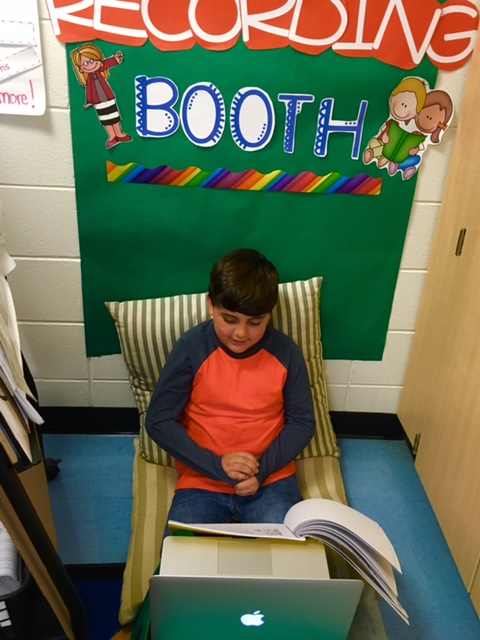
I decided to try two *somethings*, but I have a feeling, little by little, more and more ideas will be incorporated into my class. In recent weeks, I've created a Recording Booth and Digital Bulletin Boards for my students. Both of these ideas are found in the first chapter of Amplify. According to Ziemke and Muhtaris, "A class recording booth is one of the easiest ways to capture student thinking. You can create a recording booth with practically any device... Once you have a device, find a quiet corner in your classroom and start recording!" It truly is that simple. Really!

The digital bulletin board is considered any digital collaborative space you create for students to gather feedback or allow interaction among each other. There are a variety of options, but Padlet was mentioned as a favorite by the authors. Padlet is a purposeful tool that can be manipulated by students with ease. As mentioned in Amplify, "Padlet walls support images, videos and links."


The Lesson:
Since my students are already used to recording themselves in my room, I thought adding a makeshift recording booth would be simple enough. Generally, my students find a spot in the room to record various tasks, such as book trailers for their books (accessed through the use of QR Codes), their thinking about what they're reading, and even themselves reading books aloud to reflect on their fluency. The step-by-step introduction and modeling of how to record oneself was launched at the start of the year, so I was able to quickly move through the suggested tips by Ziemke and Muhtaris. Because I am in a 1:1 district, K-5 students have become well aware of the procedures for recording themselves. The management piece isn't a big focus for me, since I provide interventions for groups of 3-4 students at a time. However, two of the suggested starting points from the book are:
  • Start by modeling for students what the video should look like.
  • Add supports like a chart depicting how to start, record and stop the camera. 


For the digital bulletin board, Padlet is a great way to go.  I've been using Padlet (as well as TodaysMeet) with my students for a few years now with different intentions in mind.  Amplify gave me additional ideas for using this platform with students, such as shelfies.  Students post comments on the Padlet wall about what they are reading.  This idea ties into Donalyn Miller's  Status of the Class, where students are held accountable for independent reading.  As Miller states in her book, Reading in the Wild,  "Students practice discussing books in concise, low-risk ways; Everyone reads, everyone shares; Students hear about many books they may potentially read."  The same goes with the Padlet walls!  The images below are from our "What are you reading?" and "Padlet Pride" digital boards.  
My Reflections:
As I reflect, the recording booth was a *bestseller*, in the eyes of the students. They smiled when seeing the sign leading to our makeshift booth, as well as enjoyed the comfy pillows and colorful, green-screen background. I intend on upgrading the booth little by little with a shower curtain and other welcoming details mentioned in the book. If you don't already know, I share a small room with our talented Literacy Coach and part-time Reading Specialist, Courtney. She also pulls kids at the same time as me, so our room can get a low roar of voices at times, but nothing that disrupts the students' learning. Having the recording booth area dedicated in a space removed from other students has been very helpful. Nevertheless, I'm looking into an attachable microphone for the recording booth device, to help improve the sound quality of students' recordings.

The digital bulletin board is a fun way for the students to get ideas and inspiration from their peers. The students are loving the Padlet walls. Even though it's a digital board, I printed out a set of the students' shelfies for the passers-by in the hallway.  Yes, I decided to go *old school* this time and print their shelfies on paper (no throwing rocks, please!). Of course, digital bulletin boards can be shared with others via Schoology, Google documents, or even through the use of QR codes.
Your Turn to Take the Challenge!
Do you integrate tools into your classroom that enhance instruction while using technology, either from Amplify or beyond?  Or do you want to try creating a recording booth for students to document their thinking and/or share their favorite books like I did? How about testing out a digital bulletin board with your students?  We would love if you share your idea with us, either on your blog, by adding a quick idea to our Padlet Wall or linking up below!  We will officially challenge our district (and YOU, if you're outside of Berwyn South District 100) after the #D100chat on 5/3/2016, but you are free to take a sneak peek!

Happy Tuesday!


Related Posts Plugin for WordPress, Blogger...