Pages

Showing posts with label Technology. Show all posts

#D100bloggerPD "Ditch That Textbook" Book Study!

Welcome back for another #D100bloggerPD crew book study! I always take pleasure in starting our book study kickoff with an introduction of the crew. We consist of an assortment of Berwyn South School District teacher and administrator learners who enjoy blogging, are smitten with social media and make use of our PLNs as an irreplaceable source of powerful content, hence the hashtag #D100bloggerPD. We devote ourselves to staying globally connected. The crew embraces change, strives to better ourselves professionally, desires to join forces with our PLNs to share what we learn, and aims to inspire others (#D100inspires) because we are better together.

This #D100bloggerPD book study is dedicated to Matt Miller's Ditch That Textbook: Free Your Teaching and Revolutionize Your Classroom. If you want to lead your students in educational practices that are innovative and engaging, read this book. It's yet another invaluable book published by Dave Burgess Consulting, Inc., and highlights Matt Miller's journey in creating a classroom where great learning experiences happen for students.
The book is divided into four sections: Why Go Digital?, Ditch That Mindset, Ditch That Textbook, and Ditch That Curriculum. My post for the book study kickoff consists of a portion of section one: Why Go Digital?, which includes the Introduction and the first four chapters: Chapter 1: Free Access, Chapter 2: Boost Your Efficiency, Chapter 3: Use Technology to Defeat Insecurity, and Chapter 4: Empower Students to Find Their Passions. The chapters are brief, to the point, and filled with stories, advice and tips based on Miller's classroom experiences, so it's an effortless and fun read. Ready to dig in? :)
In the introduction to his book, Miller claims "...this book is about evolving and finding better ways to teach (p.2)." He assists in equipping our proverbial tool belts with practical, hands-on ideas that incorporate technology to globally connect our students to the world. Most likely, we all have the desire and the power to unlock the doors to fully engaged students. However, first, we must get uncomfortable, jump into the unknown, seek more advantageous ways to engross students in learning, and, of course, take risks.
On page 5, it states, "Ditch That Textbook is designed to be a support system, toolbox, and manifesto. It's a collection of ideas, considerations, and suggestions to help you free yourself as an educator to create the classroom and the teaching style you want." Let's take a look at Miller's DITCH model, which will help you get started in revolutionizing YOUR classroom.
 _____________________________________________________________________________
Why Go Digital?
Chapter 1: Free Access
Miller started out the chapter by jumping back in time with a scenario of aspiring to connect with John Dewey, the groundbreaking educational thinker and reformer from the 1900s (p.9). Miller went on to explain the lengths it would have taken him to have a mere dinner conversation with Dewey back in 1904, when Dewey was at the University of Chicago. The duration of time necessary, including the hypothetical traveling and boarding expenses, were all considered. Needless to say, it would have been quite a laborious effort for Miller to have had a professional conversation with John Dewey.    

Nowadays, however, we live in a digital world. We have access to technology, which provides an unrestricted ability to globally connect with others at a much faster rate, including researchers, authors, educators and groundbreaking educational thinkers. Using Skype, Google Hangouts, Voxer, FaceTime, and many more, are all possible from the comforts of our own home. As teachers, it is our obligation to harness these platforms, not only for our own professional development, but to apply within the classroom to better expand students' digital citizenship skills, and more fittingly prepare students for the future.      
The best thing, of course, is that connecting worldwide is FREE (for the most part). Students are now able to move from local to global connections at the touch of a button. They can learn from classrooms around the world, not just peers in their school. Take a peek below at some valuable quotes from Chapter 1: Free Access. The gist? Get out there and try something new, alongside your students!
  • These previously impossible connections can revolutionize education-- if teachers are willing to give them a shot (p. 12).
  • Instead of testing a new idea or tool, "paralysis by analysis" takes hold. We overanalyze new options, mull over all of the things we don't know, think about how students will react, and then we don't act! (p. 12).


Chapter 2: Boost Your Efficiency
Who wouldn't want to be more streamlined when it comes to preparing lessons for the classroom? This chapter justifies how technology can make life much more simple by working smarter and faster, not harder. 
Teachers now have the power to digitally distribute files and information with students through the use of Google Forms and Documents, as well as get assignments auto-graded with Google add-ons like Flubaroo (p.15). Miller stressed that, though we may love it, teaching is not our entire identity. It shouldn't consume our lives. Using technology to our advantage in the classroom, then getting out in the world to enjoy life with family and friends, is a wise decision. #agreed ;)
Chapter 3: Use Technology to Defeat Insecurity
This chapter proposed a way to provide support to students who may be weary of contributing their opinions and thoughts aloud in class discussions. Backchannels, or online discussion spaces, give a voice to every student. Using them is a worthwhile way to encourage students to privately contribute to classroom discussions, until they become comfortable in outwardly sharing in class.      
Miller discussed a particular student, named Kay, whom he had a difficult time connecting with and getting to participate in class. Only after various failed attempts was Miller able to find a way for Kay to express herself through the use of TodaysMeet.com. He claimed it to be a simple and easy-to-implement backchannel to get his students engaged in discussions and to ask and answer questions. Regarding his student, Kay, Miller stated, I wish I would have given her more alternative opportunities to showcase her genius in my class. Our best course of action is to allow those 'I wish I would have...' moments to motivate us to improve for the next round of students (p.19). So true!
On another note, unfortunately, TodaysMeet.com is no longer up and running. I'm so sad about this! I thoroughly enjoyed using this backchannel platform with my students because it displayed students' thinking in real time. (Click HERE to learn more about how I use backchannels with my kiddos.) 

However, don't fret. There are many alternatives out there, including Padlet, Flipgrid, Twitter, Google Docs, and now Yo Teach!, known as "the new alternative to TodaysMeet." A thank you goes out to Mona, an iCoach in my district (who is also part of this book study), for sharing a tweet about Yo Teach!  
Chapter 4: Empower Students to Find Their Passions
Miller describes how students are certainly capable of "playing school" and having ways of being compliant, such as studying for and doing well on tests and completing all assigned activities, worksheets, and more. However, students also seem to be graduating ill-equipped for real life, even if they are able to graduate at the top of their class.   
It's time to stop the old-fashioned sit and get mentality of schooling and start developing engaged, innovative, self-starting students. That is what future employers desire and seek to have in the workforce. Students who are able to tap into the ample resources available at their fingertips and the eagerness to explore those resources. Fostering creativity and cultivating students' imaginations will give them the drive to find their passions and purpose in life. We've all come across people in uninspiring jobs, but would we want that for our students? Of course not. Take a peek below at some constructive quotes from Chapter 4: Empower Students to Find Their Passions.
  • Students everywhere are drowning in busywork: worksheets, workbook pages, and repetitive, simplistic activities. For decades, students have been stuck in the 'do what I'm told' mentality (p.22). 
  • When teachers determine to ditch their textbook mentalities, practices, and curricula, they often find it easier to help students discover what motivates them (p. 24).
  • When you use the Internet and online tools to expand the scope of your class, you can open your students' minds to new possibilities and empower them to explore what drives them (p.25).

Thanks for stopping by Literacy Loving Gals to support the kickoff of the #D100bloggerPD book study. As the study continues in the upcoming weeks, the hyperlinks to each #D100bloggerPD crew member's post will be added HERE, to keep Matt Miller's tips from Ditch That Textbook in one spot. Click the image below to access Miller's Podcast to dive a bit deeper into his content. There are over 100 podcasts. #impressive :) We hope you continue to follow along with us! Next up, Tales of an iCoach with Chapters 5-9. 


Schedule Revealed for the Upcoming #D100bloggerPD Book Study on Ditch That Textbook

The #D100bloggerPD book study schedule for Matt Miller's Ditch That Textbook is ready for reveal, so mark your calendars! Some colleagues in my school district have banned together and are excited to get things underway. The kickoff for the book study starts on Tuesday, October 2, 2018 right here on Literacy Loving Gals. Each Tuesday, Wednesday and Thursday during the month of October, a #D100bloggerPD crew member will post a reflection on their chosen chapters from the book. The book study culminates on Reading and Owl of the Above on Wednesday, October 17, 2018.
Feel free to join in on the book study by hopping from blog to blog reflecting within the comments section. I will be hyperlinking each of the crew's posts down below, so once the book study has been completed, all links to the study will be in one place for easy access.

Happy Reading!


#D100bloggerPD's Book Study on Hacking Engagement: 50 Tips & Tools to Engage Teachers and Learners Daily, Hacks 1-5 (including a few tweets)

Welcome back for another #D100bloggerPD crew book study. I take pleasure in starting our book study posts with an introduction of the crew. We consist of an assortment of Berwyn South School District teacher and administrator learners who enjoy blogging, are smitten with social media and make use of our PLNs as an irreplaceable source of powerful content, hence the hashtag #D100bloggerPD. We devote ourselves to staying globally connected. The crew embraces change, strives to better ourselves professionally and desires to join forces with others to share what we learn because...together we are better!

This #D100bloggerPD is dedicated to James Alan Sturtevant's Hacking Engagement: 50 tips & Tools to Engage Teachers and Learners Daily. If you want a roadmap to capturing your students' attention, read this book. It's yet another invaluable book in the Hack Learning series. Mark Barnes and Jennifer Gonzalez conveyed practical and user-friendly ideas and tools for each hack in their book, Hacking Education, while Michael Fisher dispensed solutions to problems that seem to go hand in hand with the Common Core in his book, Hacking the Common Core. Now, it's time to highlight James Alan Sturtevant and his contribution of a whopping 50 strategies for all teachers and learners to be gurus of engagement! It was thrilling to see my copy of the book on the doorstep, and after reading it, I believe Sturtevant's hacks have the power to enlighten teachers on how to unlock the doors to fully engaged students.
Before I share about this book, I would like to mention how accommodating Mr. Sturtevant has been at supporting the crew. The moment a tweet went out about the #D100bloggerPD book study, he jumped at the chance to help. Good news! He's decided to join us on Twitter to chat more about how to hack engagement, so be on the lookout for a live Twitter chat on November 7, 2017. Anyone is welcome to join us! Ready to get started? Let's do this. :) 

Each crew member has chosen five out of the fifty, nifty hacks for the book study. We decided to encapsulate four hacks to give you a sense of what the book offers, while diving more deeply into one hack to demonstrate how we've implemented a particular engagement strategy. I'm kicking off the #D100bloggerPD book study with Hacks 1-5.
Hacking Engagement is filled with supportive QR codes for its readers. Sturtevant states, "When I was in the process of crafting this book, I launched the Hacking Engagement podcast, which mirrors and supplements these pages. As you read, you'll frequently encounter QR codes that will connect you to episodes (p.10)."  I've decided to link a few of his supportive podcast episodes and QR codes throughout this post for your convenience. Thank you, Mr. Sturtevant! #generous #grateful
Hack 1: Entice Reluctant Readers with QR Codes
Some of you may already know I've been an elementary Reading Specialist for the past the 9 years, but have recently added the role of Literacy Coach this past August. Being a gal who loves all things literacy, I felt delving into the hack dedicated to enticing reluctant readers would be most plausible. :)

In this hack, Sturtevant details the beliefs of Jennifer Wilson, a coordinator of instruction and innovation. Jennifer believes QR codes are an entryway connecting students with virtual content. Jennifer "uses them to link students to alluring information about books in the form of book trailers. Just as a successful movie trailer engages the audience to the point where they become obsessed with watching the show, book trailers draw in potential readers (p.11-12)." I've seen, firsthand, how QR codes and book trailers increase student engagement.

As a teacher working with mostly struggling and reluctant readers, I, thankfully, found the power of *the codes* a few years back. QR codes have been used in my intervention classroom because they not only engage my readers in school, but at home, too. Book trailers definitely have a way of lighting a spark under the most reluctant readers. When my students were given opportunities in class to entice others with trailers about their favorite books via QR codes, the student engagement and reading minutes skyrocketed. Students even requested to continue reading and creating trailers at home, as well. 
 
My students create QR codes with qrstuff.com and use free scanner apps, such as QR Reader and Scanner or i-nigma Barcode Reader, to showcase and access their content. Additionally, I often use the virtual discussion platforms, TodaysMeet and Padlet, in connection with the codes.  
The combination of these tools allow my students to highlight and discuss books they're reading with peers. After creating brief book trailers, they've uploaded them to Padlet walls, alongside *shelfies*, which are selfies with favorite books. Furthermore, my students have answered questions posted by peers about their book trailers and/or started discussions about books we've been reading on TodaysMeet.
To learn more about how I incorporate and link QR codes to content, read some of my previous posts by clicking HERE and HERE. I've even created student resources that include QR codes as a captivating way for students to self-check their work. Notice the smiles on a few of my first graders as they self-check their answers regarding multisyllabic words? #engagement
What YOU Can Do Tomorrow:

Hack 2: Adventures in Classroom Management
This hack is targeted at managing a classroom through organized routines. Sturtevant references Andy Jados, a high school principal, who has "learned that putting effort into organizing a congenial atmosphere benefits everyone (p.15)." Getting students engaged in the management of class is what produces results.

I'm sure you'll agree, one of the most important roles of a teacher is that of a classroom manager. If student learning and engagement are going to thrive, it's critical. A room filled with distractions and disorderly management can have a negative impact on students' academic performance. If we're openly honest, each of us has had moments of disorganization at some point as educators. It's okay to admit we're all human. Thankfully, perfection is not necessary for a well organized classroom. What's most important is we learn from those moments of disorganization to take steps necessary to change the outcome. Take a peek below at Sturtevant's constructive course of action to better engage students into a more manageable classroom.

What YOU Can Do Tomorrow:
  • Make a list of common distractions in your class: Think...What is disrupting the learning from taking place? 
  • Create an organization plan: Generate routines to prevent interruptions.
  • Promote your plan: Let students in on your goals to get buy-in.
  • Assign students tasks: Deputize student helpers! Tip- You may wish to give some of your most disruptive students responsibilities (p.17).
  • Debrief students: Empower them by seeking their suggestions on how to improve your plan.
For further information on this hack, check out Sturtevant's podcast as he teams up with Andy Jados to discuss classroom management.

Hack 3: Let Me See You Google
After reading Hack 3, I wanted to share a few favorite quotes with you that really encompass this hack:
  • A school that embraces Google embraces collaboration (p.19).
  • Google is engaging, powerful, familiar, and pervasive (p.19).
  • Quite simply, students are extremely comfortable expressing themselves through Google (p.20).
  • The world collaborates with Google. Make certain that you interact with students via this foundational platform (p.21).
I work in a school district that undeniably harnesses every bit of the power Google has to offer. Our staff collaborates district-wide with one another through Google Docs and Google Forms, as well as communicates with students and parents through the use of Google Classroom. We are extremely fortunate to be a Google District. If you're not using Google, what are you waiting for? They have free tech tools to engage your students.

What You Can Do Tomorrow:
Check out this podcast or scan the QR code below to learn more about Google and all of its benefits for student engagement.

Hack 4: Engage as You Gauge with SurveyMonkey
This hack is all about targeting students' preferences to get them engaged. Sturtevant says, "When it comes to our students, let's become detective-like and solve the mysteries of their preferences. Once we know what appeals to the kids we teach, we can take advantage of this knowledge to engage them in learning (p.23)." A simple, yet engaging way to seek student preferences is through the use of SurveyMonkey.

Scan the QR code below for more information.
Hack 5: Create Celebrity Couple Nicknames
My last hack for this post quickly brought to mind the well-known celebrity couple name, Brangelina. This hack is all about name blending as an amusing and engaging way to learn students' names. Sturtevant declares, "Creating celebrity nicknames will transform this tedious chore into a fun game that students will love, and it will help you connect with them immediately (p.29)."  I tried putting this hack into action with the use of Couple Name Generator. Try it for yourselves! You may even want to share it with your students. :)   
Thanks for stopping by Literacy Loving Gals to kick off the book study. As the study continues in the upcoming weeks, the hyperlinks to each #D100bloggerPD crew member's posts will be added HERE to help keep the fifty, nifty engagement hacks in one spot. We hope you continue to follow along with us!

Next up: See Jane Blog! 

Happy Engagement Hacking! 


Using Today's Meet, Padlet Walls and QR Codes for Reading Engagement

This post is dedicated to one of my very talented and dedicated teacher friends, Kelly, who is also a motivating workout partner, as well as a few of my awesomely accomplished #PLN pals on Instagram: Sarah from Snippets by Sarah, Lori from Conversations in Literacy and Christiana from Lasting Literacy. They inquired about the use of the QR code in the picture above, and instead of explaining it on Instagram, I decided I'd write a little "tech post", since it's been a while. 

In this post, I will share some information to help you create a TodaysMeet chat room, in addition to a Padlet wall. Both of these platforms are wonderful backchannels to hold students accountable and to capture their thinking! I will then go on to explain how students can access these online platforms without an account, login or password. In this case, I truly believe these online platforms are quite easier used than explained, but let's see how I do. ;)

To keep my students interested, engaged and accountable when responding to reading inside or outside of my RtI intervention room, I have them use a combination of tools: QR code scanner apps, such as QR Reader and Scanner or i-nigma Barcode Reader, QR codes from qrstuff.com, TodaysMeet and Padlet, all which are FREE. That's the best part, for sure. 

I am blessed to work in a school district implementing 1:1 iPad technology. All students have access to their own iPad, and since my intervention time is so brief with the students, these tools can be used from their classroom, home, or even the library, as long as they have their book, a QR code and an iPad or other device loaded with a scanner app. 

Let's get underway. Since YouTube is my go-to resource for all how-to tutorials, I used this link HERE to learn  how to set up my chat room, so please take a moment to do the same before continuing. Multiple temporary chat rooms can be created and sorted, depending on your needs. Your chat rooms have an expiration date extending anywhere from one hour to one year. 
Once my students are in the chat room, I have them enter their initials in the Nickname area, hit Join, type their responses to my posed question(s) into the blue box and then hit Say. When the students strike the Say button, others in the group can view their peers' responses, similar to a working document in Google.
Student comments and responses can only be 140 characters, just like Twitter, however, they can respond multiple times. This allows students to extend on their thoughts, read and respond to others' comments, as well as pose their own questions they may have. It's a great way to get kids engaged in conversations with peers about their reading. Since responses are typed, there are no interruptions from others around them. This is definitely a pro, especially in a classroom with 28+ students. Having typed responses also gives a voice to shy students who my be hesitant to amplify their voice in an oral classroom discussion. Empowering, right? 

An example of a few responses from a 3rd grade group is below. Keep in mind, we are an intervention group, so student responses and ideas are always under construction, but ever evolving. ;)
Moving on to Padlet. Once again, I self-educate on YouTube, so click HERE for the teacher tutorial video that helped me create my own walls. Padlet is just as simple to set up as TodaysMeet and permits you to create unlimited walls, just as TodaysMeet enables you to create as many chat rooms as you wish. You have the ability to customize each wall with different backgrounds, in addition to wall names and descriptions.

Once you create a wall, students access it with a link you provide them. (The video tutorial explained one way to share the link, but at the end of this post, I will show you another way. Hang tight!) Students double click in an open area on the wall. The box below is what the students view once they have double clicked. The icons in the box allow students to add text, record their voices (videos), add hyperlinks, photos and documents. Amazing customizable uses, especially for a free platform.
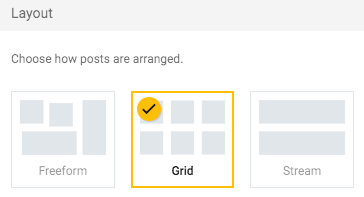
You can organize the students' response posts in 3 ways: Freeform, Stream and Grid. I usually choose Grid as shown in the picture below, so the most recent posts appear first. Both TodaysMeet and Padlet allow teachers to view the students responses while they're working, so you can keep track of their participation, or lack of participation in some cases.
If you prefer to keep your wall private from the public, there are options to do so. I prefer to keep my rooms Secret.
I recommend you playing around with Padlet a bit to get the hang of how to use it. There are plenty of links out there on the web to support you, but there's Padlet at a glance. If you would like to see a previous post I've written on using Padlet in the classroom alongside a makeshift *recording booth*, click HERE. 

Lastly, you may be asking yourself, how do my students access the TodaysMeet chat rooms or Padlet walls I create? Well, all you have to do go to qrstuff.com, copy and paste each URL from the chat rooms and Padlet walls you have created into where it says Website URL (see the blue arrow). Choose the color for your QR code, then download the customizable code that appears. 
I love how the codes can be created in different colors. My students have associated my blue codes, for example, with TodaysMeet and my black codes with Padlet, even though I print them out with headings. For example, the blue code has Team Noffsinger's TodaysMeet Access Code typed above it.


As a last step, I print out the codes, sticky tack them to my classroom walls in different areas, as well as send them home in the students' Take-Home book bags. They use their iPad or other device to pull up a scanner app, such as QR Reader and Scanner or i-Nigma Barcode Reader, to scan the code to access the chat room or wall. 

I hope this post was helpful to someone out there and that I haven't confused you. Please be willing to explore a bit. I think you'll be happily surprised. 

Have a great weekend!

UPDATE: #Yay :)


Related Posts Plugin for WordPress, Blogger...