Pages

Showing posts with label Bulletin Boards. Show all posts

Thank You for the #GrowthMindset Idea!

About a week ago, I stumbled across a bulletin board idea on Twitter that sparked my interest and got my wheels turning.  I decided to recreate the board for my classroom.  I don't have much space, since I share a small area with my school's Literacy Coach.  I also don't have any bulletin boards on my side of the room, so I had to adapt the idea to fit on the wall in the entryway of our room.  I chose to make the *growth* side of the board blue and gold (my school's colors), and then added #IrvingPride to personalize it a bit more. :) The idea came from Angie Olson over at Lucky Little Learners.  Her photo that sparked my interest is below.  Awesome, right?
Anyway, I just wanted to give her a shout out for sharing this idea. My students will certainly benefit from changing their mindsets. 

Thanks for collaborating globally, Angie!

Spark Interest with a QR Code Bulletin Board for Reading!

I'm here to share a quick and easy-to-create bulletin board idea for teachers out there trying to spark some student interest in Reading, while incorporating a sprinkle of technology.  If you follow my blog, you know I've created a board similar to this, but it was for the students to guess which staff members in my school love to read. Some teachers wore disguises, which is another fun option you can do for this bulletin board. :)  Click HERE for the post.
I created the "Guess Who Loves to Read?" bulletin board for the outside of the door leading into my classroom.  It sparks student interest, adds color to the hallway and is fun for the students *hiding* in the pictures.  This board shows some of my kiddos I will be working with this upcoming school year. 
If you use QR Codes with your students, you're probably familiar with QRStuff.com.  However, if you are new to them, this site is very straight forward and simple to use.  Once you go to QRStuff.com, you will see a Data Type column.  To create the codes I placed on the students' pictures, click on Plain Text under the Data Type column.  Once you click on Plain Text, the Content box pops up. In that box, I typed each student's name along with *loves to read!* (example: "Isadora loves to read!").
Once you finish typing in the text box, a QR Code gets created and can be downloaded and added to any picture or file you wish to use for the bulletin board.  You also have the option to change the QR Code to various colors.  As you can see, for this board, I kept each code black.  


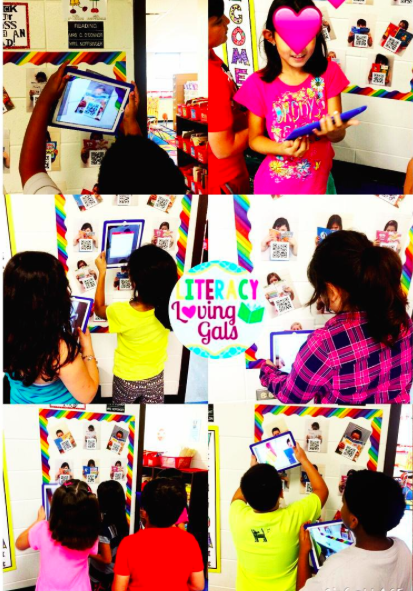
After a QR Code is created for each of your students, take pictures of them with their favorite book, but don't make their faces fully visible.  Guessing is what sparks the interest!  Having students choose their *favorite* book actually gives you an informal peek into the types of books they like to read.  You're hitting two birds with the proverbial stone!  Some examples are below. 
Students then use iPads to scan the QR Codes.  Up pops the name of the student hidden under their favorite book.  That's it!  Quick and simple.

Enjoy and have a great weekend!

Five for Friday with a Freebie- March 20 Edition


I'm linking up with Doodle Bugs for Five for Friday and Teaching Blog Addict for Freebie Friday, since I have a freebie to share this week. :)
We've been working on Cause & Effect this week, so if you're interested in this freebie, click the image above to head on over to my TpT store to grab your copy!  Of course, ratings are always appreciated. :)
My students finished up their Instagram projects.  They had a good time responding to their texts as characters from their stories.  This Instagram activity is a freebie in Erin Klein's TpT store.  If you have the time, rate her as well.  I'm sure she'd appreciate it! :)
I stopped by Target, one of my favorite stores, and picked up these adorable Spring-themed erasers.  We've been using them for dictated writing associated with the LLI Kit.  The erasers represent each word in an orally dictated sentence.  It helps the students keep track of the number of words they need to write.  The students are loving them. :) 

A little Readers' Theater on a Friday afternoon is always time well spent.  The students love performing and I love additional opportunities for them to practice their fluency.  We're hitting two proverbial birds with one stone! :)
I walked by the bulletin board last week on a day it was 74 degrees.  I cringed realizing I should probably update the board containing little snowflakes all over it along with titles of winter-themed books to read.   I tried to *work a little magic* on the board.  As you can see, I decided to create a "Spring into a Good Book!" board.  Above is how it turned out.  The passers-by seem to enjoy it. :)

Well, there's a peek into my week.  Thank you to Sallie Borrink for the polka dot backgrounds.  Happy Spring everyone! 


Five for Friday with GarageBand, Phonics, Writing and more!

Happy Friday!  I'm linking up with Doodle Bugs for another edition of Five for Friday.  Thanks for hosting, Kacey!


GarageBand is a great program to use when trying to motivate students to read fluently.  After practicing the different components of fluency, I have the students record themselves reading a portion of their text and then listen to their recordings.  Students are asked to self-reflect on what went well and what could be improved.  I love how honest my students are with themselves.  They really want to become better and more fluent readers.  Promoting self-reflection is key for students to make progress.   


The posters I use to review the components of fluency are from Deb Hanson over at Crafting Connections.  I love how they are both adorable and useful! 


We practiced the three sounds of -ed this week.  After reviewing these charming posters from Teaching with Love and Laughter, the students read words with -ed and then placed them into the correct columns based on the sound they heard at the end of the each word. 

They really got the hang of it and were able to transfer their learning when writing in their notebooks! :)  

Earlier this year, I picked up a few rolls of writing paper at Target in the One Spot area.  The students absolutely loved responding to their writing on a roll of paper.  We also participated in some Interactive Writing, otherwise known as Sharing the Pen.  This is another fun activity for my kiddos because they love coming up to the board to *show what they know*.  I love how the little things motivate them so much!    


 I created a Winter Books themed bulletin board in the hallway for all students in the school to view.  I got the idea from Pinterest, one of my favorite go-to places for ideas.  I've been catching students hanging out near the board discussing the book covers.  Yay!  Anything to get students motivated to read or talk about books is a great thing. 


Are you on Instagram?  I just LOVE IG!  It's splendid for connecting with fabulous teachers from around the globe, as well as getting ideas and support for your classroom.   Anyway, I've been participating in an Instagram 6-Day Photo Challenge for teachers this past week.  Lots of fun!  I enjoy seeing what other teachers are up to and get to learn a bit more about them.  If you're on IG, the challenge is hosted by @highschoolteacher.  Here are some of my photos from the first 5 days of the challenge. 
Well, there's a peek into my week.  Don't forget to link up with Doodle Bugs for your Five for Friday


Related Posts Plugin for WordPress, Blogger...